
Highly Secure Access to Data, Applications and Networks
Universal ZeroTrust Exchange (UZE) – The Post-ZeroTrust Secure Access Solution by sayTEC

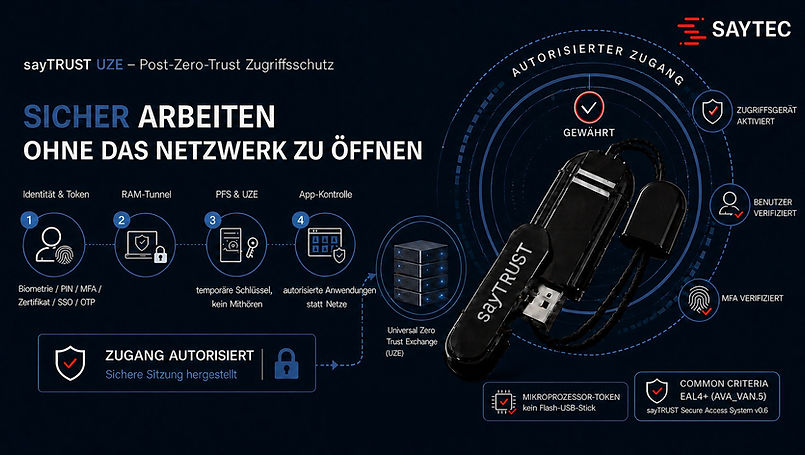
sayTRUST UZE Post-ZeroTrust Secure Access is a groundbreaking Zero Trust technology designed to provide secure, encrypted access to enterprise networks, both internally and externally. It enables highly secure communication and data exchange without backdoors or opportunities for unauthorized manipulation.
sayTRUST provides a highly secure working environment, whether working from home or on the move. By identifying and eliminating vulnerabilities between users and protected networks, it delivers an exceptional level of communication security.
With its 9-layer Defence-in-Depth architecture, users can work securely within their corporate networks or connect remotely from external locations, home offices and mobile hotspots.
Why sayTRUST Post-ZeroTrust?
At sayTEC, security begins with user identity and authorization — before establishing a tunnel, before communication starts, and before granting access to an application or secure environment.
sayTRUST connects the central UZE server with hardware- or software-based UZE clients. Only explicitly authorized communication channels to a specific application, service, machine or defined location are permitted. Users are never granted general access to the corporate network.
The security chain begins with the unique identification of the user, even before accessing the computer. Only then is the protected client environment activated. Security policies and the current security status are verified before the specifically authorized communication channel is established.
Post-ZeroTrust is the foundation of the entire sayTEC security architecture. sayTRUST UZE is the technical platform that puts this principle into practice.
Post-ZeroTrust Instead of VPN – We've Taken Zero Trust a Step Further:
-
Lower costs
-
Easy to use
-
Application-level communication instead of network-to-network connections
-
Nine layers of access security
-
Security begins before the tunnel is established
-
No software or access credentials stored on the client PC
-
Personal user identification (PKI)
-
Proprietary, tamper-proof and protected certificates
-
Up to 80% reduction in administrative effort

The sayTRUST Access USB client (1) is highly secure and highly flexible:
-
When plugged into any PC, the user is prompted to authenticate (2).
-
Once authentication is complete, the sayTRUST menu (3) launches.
-
From the sayTRUST menu, a direct connection to each application is established using encrypted RAM, leaving no traces on the PC.
The solution consists of a server and a client component, such as a USB access stick. The server can operate either as a hardware appliance or as software. USB sticks are available with two-factor authentication (2FA) or three-factor authentication (3FA).
Internal and External Workstations Are Protected by the Same Security Principles
sayTRUST UZE is designed not only for home offices and mobile users. Internal workstations, personal devices, third-party access and isolated network segments can all be protected using the same security principles.
The key lies in the combination of multiple security layers. This keeps servers and critical resources highly isolated from endpoint devices. Unauthorized systems remain invisible, cannot be freely addressed and cannot be accessed directly.
.
Why the Tunnel Alone Is Not Enough
Traditional VPN solutions connect a remote computer to a network or network segment, even when the connection is encrypted. If the client is compromised, this connection itself can become an attack vector. Zero Trust and ZTNA improve access control, but sayTRUST UZE takes the concept further: Instead of opening the network, only explicitly authorized communication to a specific resource is permitted — such as an application, service, machine or voice and video communication system.
The Single Sign-On (SSO) password manager provides a high level of security. Login credentials for various applications and platforms are managed through the user's encrypted database. When an application is launched, the SSO module automatically handles secure authentication in the background. Each application remains protected by its own individual password.
In corporate environments, this enables the separation of sales, production and administrative networks. In hospitals, for example, patient records can be made accessible exclusively to authorized medical and administrative personnel.

In addition to widely recognized security standards (SSL, TLS, X.509 certificates with 2048-bit keys, and Diffie-Hellman Perfect Forward Secrecy linked to the user's personal certificate), further unique security features have been implemented. These include establishing connections at the application level rather than through a conventional Layer 2 or Layer 3 VPN tunnel. This allows malicious software to be blocked at the tunnel entry point. With its own Certificate Authority (CA), certificates are generated on demand rather than obtained from an external provider.
All communication is established from the encrypted memory (RAM) of the client computer. As a result, no data traces are left on the computer or along the communication path that could be analyzed later. This protection is also designed to prevent man-in-the-middle attacks.
Encrypted communication requires neither a dedicated virtual network adapter nor a separate IP address within the protected network. The network and its associated information remain invisible to external systems. Even on the client PC, the connection itself is not visible. The device neither knows nor stores network information about the protected remote network.
A key advantage for users is that their personal working environment is always available. They can work with a high level of security from virtually any PC.
Administrators centrally configure user permissions, working environments and access to applications and directories. Users sign in once and gain automatic access to all authorized applications without repeatedly entering passwords.